| English | Japanese |
|
Yesterdays access |
|
| Page Top | [Lily Diary.】 A diary of life in Mindanao. |
| 26/11/07 | SatBox_Ver0.1.1c-beta IC-9700 Test Version |
| 26/11/07 | SatBox User Guide |
| 26/11/03 | An FT-847 for SatBox Development |
| 26/11/02 | Buying a ZT219 Digital Multimeter |
| 26/10/28 | Building a home server using Linux |
| 26/10/27 | Repeater Controller Features and Settings |
| 26/10/27 | Repeater Controller Board and Firmware |
| 26/10/26 | JTDX Auto Run Ver0.7.7 |
| 26/10/26 | WSJT-X Auto Run Ver0.1.6 |
| 26/10/22 | Memories of UNIX and Networking from My Yonezawa Ham Shack |
| 26/10/20 | Acquiring a YAESU FT-2600M for a Repeater |
| 26/10/19 | Rotator Relay Interface for Sale |
| 26/10/18 | Kenpro Rotator Interface KiCAD DATA |
| 26/10/17 | JOTA in Indonesia: Jamboree on the Air |
| 26/10/17 | You Can Now Leave Comments |
| 26/10/11 | Installing Arduino IDE |
| 26/10/09 | DXCC200 Sticker Arrives from ARRL |
| 26/10/08 | SatBox Cloud Released |
| 26/10/06 | Bought an ECS LIVA Z Mini PC on Yahoo Auctions |
| 26/10/05 | QSO with C5R in The Gambia |
| 26/10/04 | Installing Raspberry Pi OS |
| 26/10/02 | Repeater Controller Features and Settings |
| 26/10/01 | Repeater Controller Board and Firmware |
| 26/09/30 | Ordering PCBs and Assembly from JLCPCB |
| 26/09/24 | UNITRUST Electronics Parts Shop |
| 26/09/22 | Kenpro Rotator Interface |
| 26/09/18 | SatBox KiCad PCB and firmware |
| 26/09/14 | designed a circuit board for SatBox |
| 26/09/12 | Solar Power System Plan |
| 26/09/09 | Satellite SatBox Part 4 |
| 26/09/04 | My grandson Zion |
| 26/08/29 | Ham Fair 2026 to be held |
| 26/08/25 | QSO with RI1FJL from Franz Josef Land |
| 26/08/23 | Satellite QSO via RS-44 |
| 26/08/22 | Currently, Satellite VUCC46 |
| 26/08/16 | Satellite SatBox Development in Progress - Part 3 |
| 26/08/05 | IC-820H Receiver Sensitivity Test |
| 26/08/02 | Satellite SatBox Development in Progress - Part 2 |
| 26/07/16 | Delivery of the 3D printed panels |
| 26/07/09 | Development of SatBox for satellites |
| 26/07/05 | Weather Monitor Indoor Unit |
| 26/06/30 | Creating data for 3D printers using FreeCAD |
| 26/06/16 | Installing an AS5600 magnetic encoder on a KR-500. |
| 26/06/05 | Grandson Zion's CQ |
| 26/06/04 | Replacing the potentiometer on the KR-500 elevation rotator |
| 26/06/03 | Making a Repeater Controller Pert4 |
| 26/06/01 | Weather Monitor software |
| 26/05/31 | Weather Monitor |
| 26/05/21 | JTDX Auto Run BUGFIX |
| 26/05/17 | Repair of satellite antenna system |
| 26/05/13 | Repair of Alinco DR130 |
| 26/05/07 | Making a Repeater Controller Pert3 |
| 26/05/03 | Indonesian satellite friend YC8RPK |
| 26/04/26 | DXCC200 achieved |
| 26/04/23 | Communication via ISS voice repeater |
| 26/04/20 | WSJT-X Auto Run Ver0.1.5 |
| 26/04/19 | Got an Alinco DR-130 |
| 26/04/15 | Clublog Charts |
| 26/04/10 | Regarding POC transceivers |
| 26/04/08 | Using KENWOOD AT-300 with YAESU radio |
| 26/03/17 | How to establish a radio club in the Philippines |
| 26/03/10 | KENWOOD AT-300 with YAESU radio |
| 26/02/27 | Philippine NTC Amateur Radio License Examination Question Bank |
| 26/02/20 | Package received from JK1SNS |
| 26/02/18 | Temporary License Renewal |
| 26/02/14 | Satellite Tracking Software SatTrack |
| 26/02/05 | Making a Repeater Controller Pert2 |
| 26/02/02 | CQ on satellite IO-86 |
| 26/01/27 | Shack & Repeater Controller |
| 26/01/16 | Making a Repeater Controller |
| 26/01/16 | Making aRotator Interface PCB |
| 26/01/10 | Satellite antenna installation |
| 26/01/08 | WSJT-X Remote Operation |
| 26/01/07 | JTDX Remote Operation |
| 26/01/04 | log_reciver_Ver2.6.6 |
| 26/01/04 | Tailscale VPN software for JTDX_Remote |
| Online Multiple Choice Reviewers to the Phil Amateur Radio Examination by 4F3EW A joint project by JI1FGX/DU9 and DV9JRD |
| Bought an ECS LIVA Z Mini PC on Yahoo Auctions (October 6, 2026) | ||||||||||||||||||||||||||||||||
|---|---|---|---|---|---|---|---|---|---|---|---|---|---|---|---|---|---|---|---|---|---|---|---|---|---|---|---|---|---|---|---|---|
|
I bought an ECS LIVA Z mini PC on Yahoo Auctions for 5,082 yen. The total, including shipping, was 6,272 yen.
Until yesterday, I was considering a Raspberry Pi 3B. After discussing the options with ChatGPT, I found the LIVA Z appealing for its two Ethernet ports and expandable memory and storage. I plan to install Linux and use it as a machine that runs continuously for VPN access. The CPU is an Intel Pentium N4200, and the memory capacity is 4 GB. However, the listing did not specify the storage capacity. I will check it when the PC arrives. Here is a comparison of the main specifications of the Raspberry Pi 3B and LIVA Z, with VPN use in mind.
Although I have bought it, I expect delivery by EMS to take about a month. |
||||||||||||||||||||||||||||||||
Photo 1: Front USB Ports and Power ButtonFrom left to right in the photo, the front panel has a power button, three USB Type-A ports, one USB Type-C port, and a combined headphone and microphone jack. According to the manufacturer, all four USB ports support USB 3.1 Gen 1. For the Linux installation, I can connect the installation USB drive and a USB keyboard to the Type-A ports. I plan to borrow a keyboard from my daughter Jinny's husband, so I should not need to buy one just for this setup. Having the ports together on the front should also make it convenient to connect and disconnect USB devices. 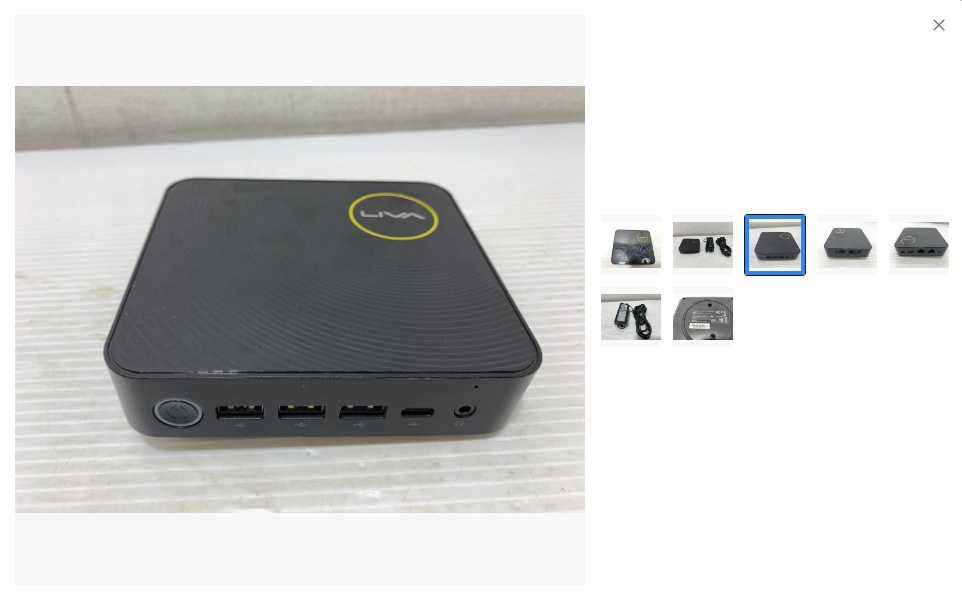 |
||||||||||||||||||||||||||||||||
Photo 2: Rear Video Outputs and Two Ethernet PortsFrom left to right in the photo, the rear panel has a Mini DisplayPort, an HDMI port, two Ethernet ports, and a power connector for the AC adapter. Mini DisplayPort and HDMI provide video output to a monitor. For the Linux installation, I can use whichever output matches the monitor I have available. Both Ethernet ports support Gigabit Ethernet at up to 1 Gbps. Initially, I plan to place the PC in my radio room and connect it via Wi-Fi. If I later move it closer to the router, a wired connection will also be an option. The two Ethernet ports leave room to experiment with connecting different networks in the future, although I do not need to use both ports to get started with VPN access. 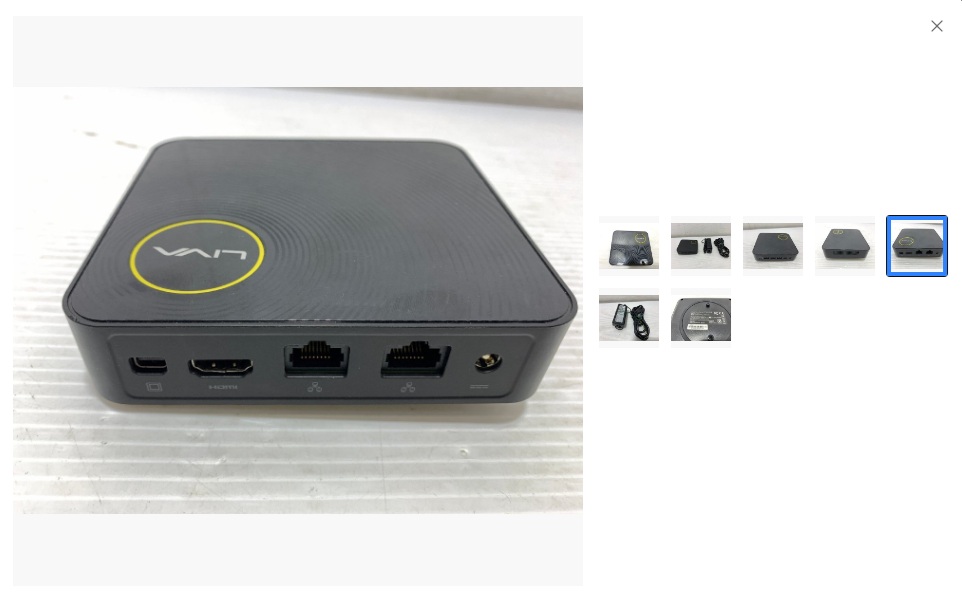 |
||||||||||||||||||||||||||||||||
LIVA Z Specifications
|
||||||||||||||||||||||||||||||||
Why I Chose the LIVA ZThe router is in the living room, and I initially plan to keep the VPN machine in my radio room with a Wi-Fi connection. The LIVA Z supports 5 GHz 802.11ac as well as 2.4 GHz, allowing me to choose a connection according to the wireless conditions at its location. I will check how well it connects after it arrives. The deciding factors were the price of 6,272 yen including shipping, the generous selection of Ethernet and USB ports, and the expandable memory and storage. The unit I bought has an N4200 CPU and 4 GB of memory, but its storage capacity is still unknown. The table above shows specifications for the LIVA Z series. I will start by using it for VPN access. If it has enough capacity to spare, I would also like to use it for a server running continuously for SatBox-related tasks, file sharing, or similar purposes. I will decide how much it can handle after checking the configuration and operation of the unit that arrives. Specification reference: ECS Official LIVA Z Specifications |
||||||||||||||||||||||||||||||||
Preparing to Install Ubuntu ServerWhile waiting for the LIVA Z to arrive, I have prepared a USB installation drive for Ubuntu Server 24.04 LTS. The ISO file is available from the Official Ubuntu Server Download Page or the Ubuntu 24.04 LTS Release Page. Since the LIVA Z has a 64-bit Intel CPU, I will choose the "64-bit PC (AMD64) server install image." Despite the AMD64 name, this format also works with this Intel CPU. The file listed when I checked on October 6, 2026 was I download the ISO file on a Windows PC and write it to a USB drive using Rufus. Writing the image erases the contents of the USB drive, so I first back up any files I need to keep. When the PC arrives, I plan to connect a monitor and the borrowed USB keyboard, then boot from the USB drive to install Ubuntu Server. Its usual text-based interface does not require a mouse. During the initial setup, I will also enable SSH and check that I can connect over the LAN from my regular PC. Once that works, I can return the keyboard and continue operating the LIVA Z remotely. |
||||||||||||||||||||||||||||||||
| October 5, 2026 October 8, 2026 | ||||||||||||||||||||||||||||||||