| English | Japanese |
|
Yesterdays access |
|
| Page Top | [Lily Diary.】 A diary of life in Mindanao. |
| 26/11/07 | SatBox_Ver0.1.1c-beta IC-9700 Test Version |
| 26/11/07 | SatBox User Guide |
| 26/11/03 | An FT-847 for SatBox Development |
| 26/11/02 | Buying a ZT219 Digital Multimeter |
| 26/10/28 | Building a home server using Linux |
| 26/10/27 | Repeater Controller Features and Settings |
| 26/10/27 | Repeater Controller Board and Firmware |
| 26/10/26 | JTDX Auto Run Ver0.7.7 |
| 26/10/26 | WSJT-X Auto Run Ver0.1.6 |
| 26/10/22 | Memories of UNIX and Networking from My Yonezawa Ham Shack |
| 26/10/20 | Acquiring a YAESU FT-2600M for a Repeater |
| 26/10/19 | Rotator Relay Interface for Sale |
| 26/10/18 | Kenpro Rotator Interface KiCAD DATA |
| 26/10/17 | JOTA in Indonesia: Jamboree on the Air |
| 26/10/17 | You Can Now Leave Comments |
| 26/10/11 | Installing Arduino IDE |
| 26/10/09 | DXCC200 Sticker Arrives from ARRL |
| 26/10/08 | SatBox Cloud Released |
| 26/10/06 | Bought an ECS LIVA Z Mini PC on Yahoo Auctions |
| 26/10/05 | QSO with C5R in The Gambia |
| 26/10/04 | Installing Raspberry Pi OS |
| 26/10/02 | Repeater Controller Features and Settings |
| 26/10/01 | Repeater Controller Board and Firmware |
| 26/09/30 | Ordering PCBs and Assembly from JLCPCB |
| 26/09/24 | UNITRUST Electronics Parts Shop |
| 26/09/22 | Kenpro Rotator Interface |
| 26/09/18 | SatBox KiCad PCB and firmware |
| 26/09/14 | designed a circuit board for SatBox |
| 26/09/12 | Solar Power System Plan |
| 26/09/09 | Satellite SatBox Part 4 |
| 26/09/04 | My grandson Zion |
| 26/08/29 | Ham Fair 2026 to be held |
| 26/08/25 | QSO with RI1FJL from Franz Josef Land |
| 26/08/23 | Satellite QSO via RS-44 |
| 26/08/22 | Currently, Satellite VUCC46 |
| 26/08/16 | Satellite SatBox Development in Progress - Part 3 |
| 26/08/05 | IC-820H Receiver Sensitivity Test |
| 26/08/02 | Satellite SatBox Development in Progress - Part 2 |
| 26/07/16 | Delivery of the 3D printed panels |
| 26/07/09 | Development of SatBox for satellites |
| 26/07/05 | Weather Monitor Indoor Unit |
| 26/06/30 | Creating data for 3D printers using FreeCAD |
| 26/06/16 | Installing an AS5600 magnetic encoder on a KR-500. |
| 26/06/05 | Grandson Zion's CQ |
| 26/06/04 | Replacing the potentiometer on the KR-500 elevation rotator |
| 26/06/03 | Making a Repeater Controller Pert4 |
| 26/06/01 | Weather Monitor software |
| 26/05/31 | Weather Monitor |
| 26/05/21 | JTDX Auto Run BUGFIX |
| 26/05/17 | Repair of satellite antenna system |
| 26/05/13 | Repair of Alinco DR130 |
| 26/05/07 | Making a Repeater Controller Pert3 |
| 26/05/03 | Indonesian satellite friend YC8RPK |
| 26/04/26 | DXCC200 achieved |
| 26/04/23 | Communication via ISS voice repeater |
| 26/04/20 | WSJT-X Auto Run Ver0.1.5 |
| 26/04/19 | Got an Alinco DR-130 |
| 26/04/15 | Clublog Charts |
| 26/04/10 | Regarding POC transceivers |
| 26/04/08 | Using KENWOOD AT-300 with YAESU radio |
| 26/03/17 | How to establish a radio club in the Philippines |
| 26/03/10 | KENWOOD AT-300 with YAESU radio |
| 26/02/27 | Philippine NTC Amateur Radio License Examination Question Bank |
| 26/02/20 | Package received from JK1SNS |
| 26/02/18 | Temporary License Renewal |
| 26/02/14 | Satellite Tracking Software SatTrack |
| 26/02/05 | Making a Repeater Controller Pert2 |
| 26/02/02 | CQ on satellite IO-86 |
| 26/01/27 | Shack & Repeater Controller |
| 26/01/16 | Making a Repeater Controller |
| 26/01/16 | Making aRotator Interface PCB |
| 26/01/10 | Satellite antenna installation |
| 26/01/08 | WSJT-X Remote Operation |
| 26/01/07 | JTDX Remote Operation |
| 26/01/04 | log_reciver_Ver2.6.6 |
| 26/01/04 | Tailscale VPN software for JTDX_Remote |
| Online Multiple Choice Reviewers to the Phil Amateur Radio Examination by 4F3EW A joint project by JI1FGX/DU9 and DV9JRD |
| SatBox Standalone Amateur Satellite Tracking Controller (2026/09/09) | |||||||||||||||||||||||||||||||||||
|---|---|---|---|---|---|---|---|---|---|---|---|---|---|---|---|---|---|---|---|---|---|---|---|---|---|---|---|---|---|---|---|---|---|---|---|
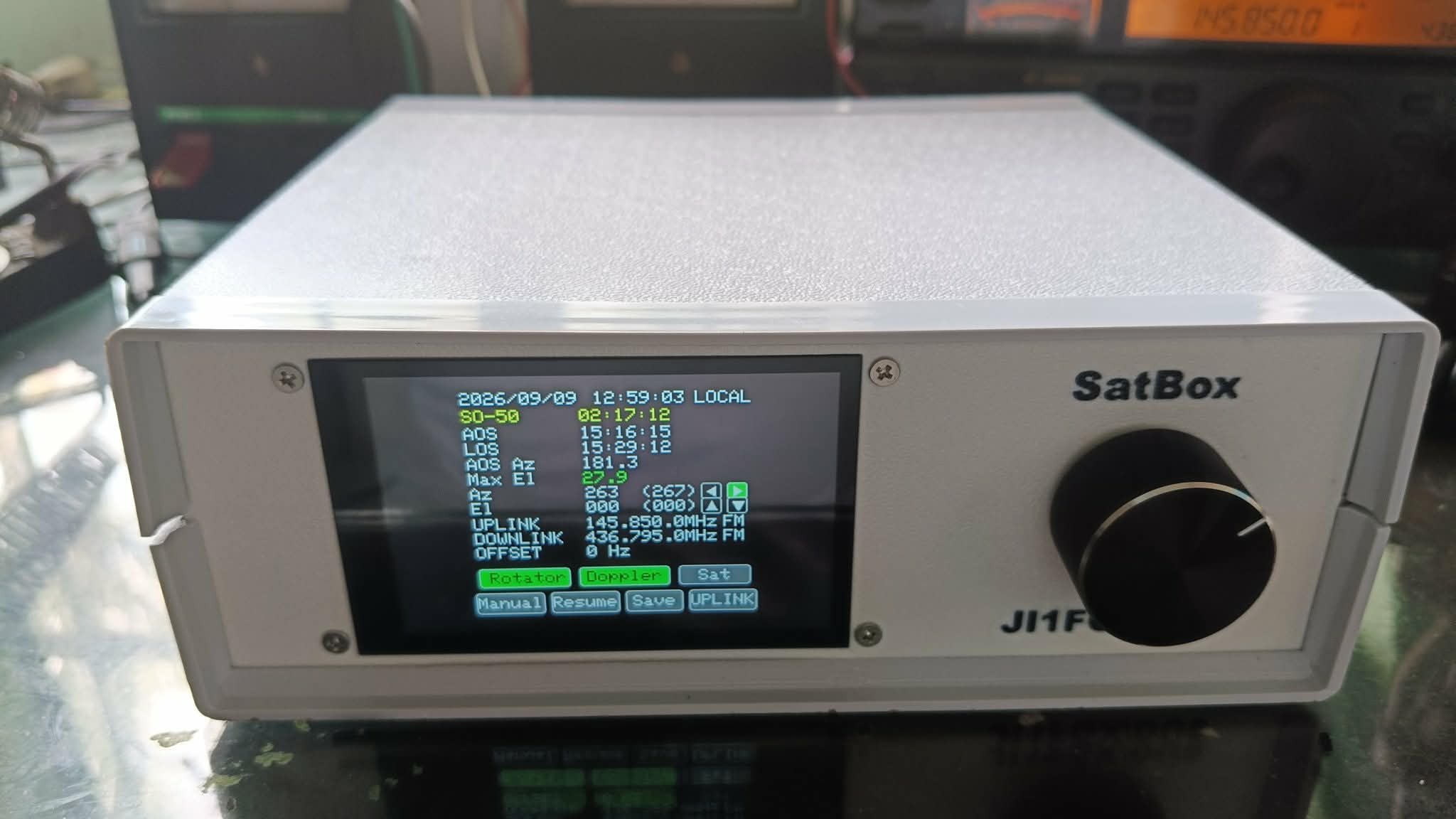 SatBox under development, built around an ESP32-S3.
Equipped with a 3.5-inch capacitive-touch LCD and a rotary encoder. |
|||||||||||||||||||||||||||||||||||
What is SatBox?SatBox is anESP32-S3-based standalone satellite tracking controller.Without a continuously connected PC, SatBox calculates satellite orbits, predicts AOS/LOS, controls antenna azimuth/elevation, corrects radio Doppler shift, provides AOS notifications and sends QSO log data. Log storage and uploads to external services use a log server running on a Windows PC. Previously, SatBox handled radio Doppler correction while SatPC32 controlled the rotator. On September 9, 2026, I connected SatBox directly to the rotator controller and confirmed automatic AZ (azimuth) and EL (elevation) tracking. The photographs show prototype wiring. Satellite Tracking → Rotator Control → Doppler Correction → Radio Control → QSO Logging
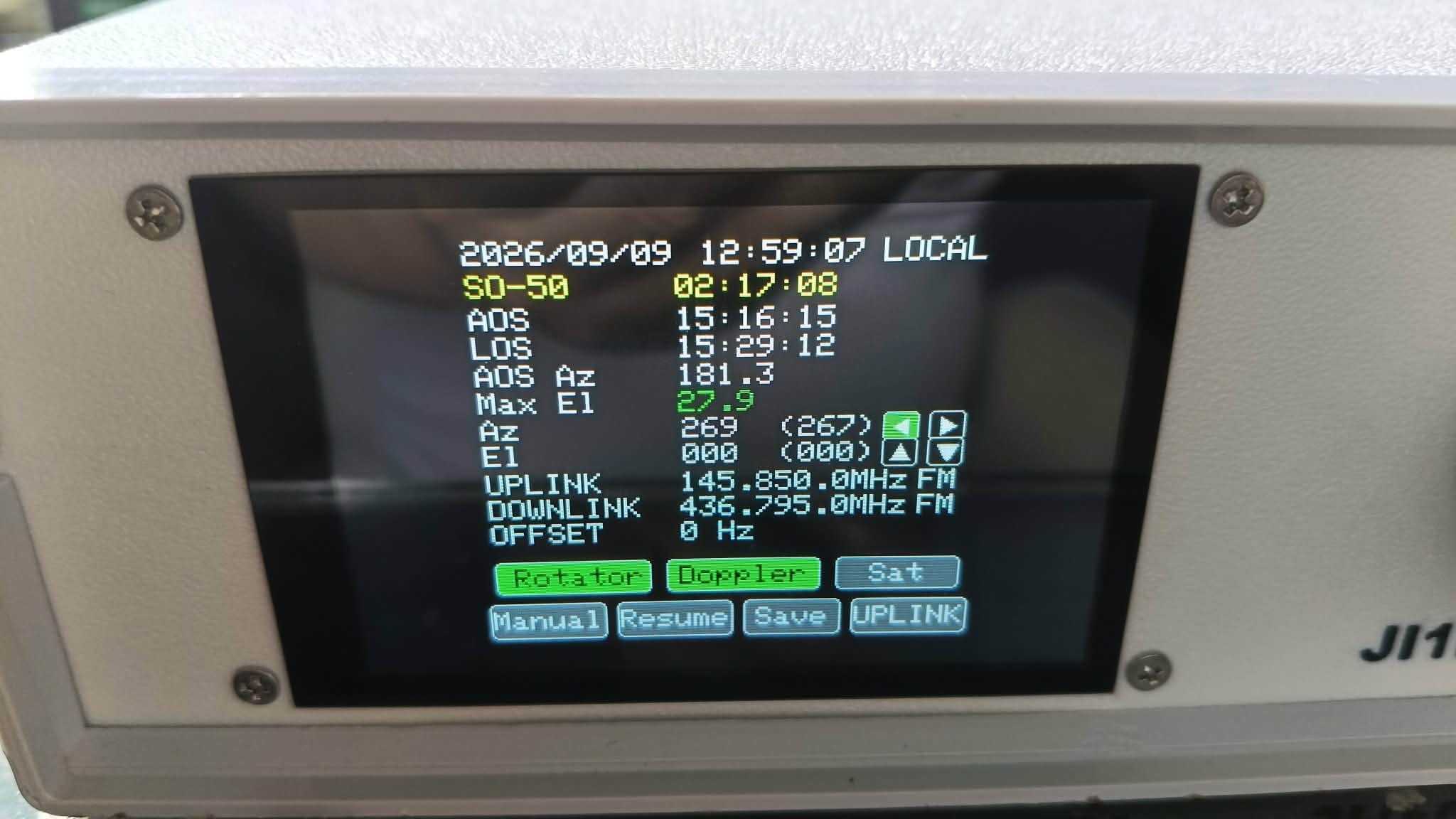
Main screen showing the satellite name, AOS/LOS, azimuth/elevation, uplink/downlink frequencies, OFFSET, and rotator/Doppler control status.
|
|||||||||||||||||||||||||||||||||||
SatBox Setup Screen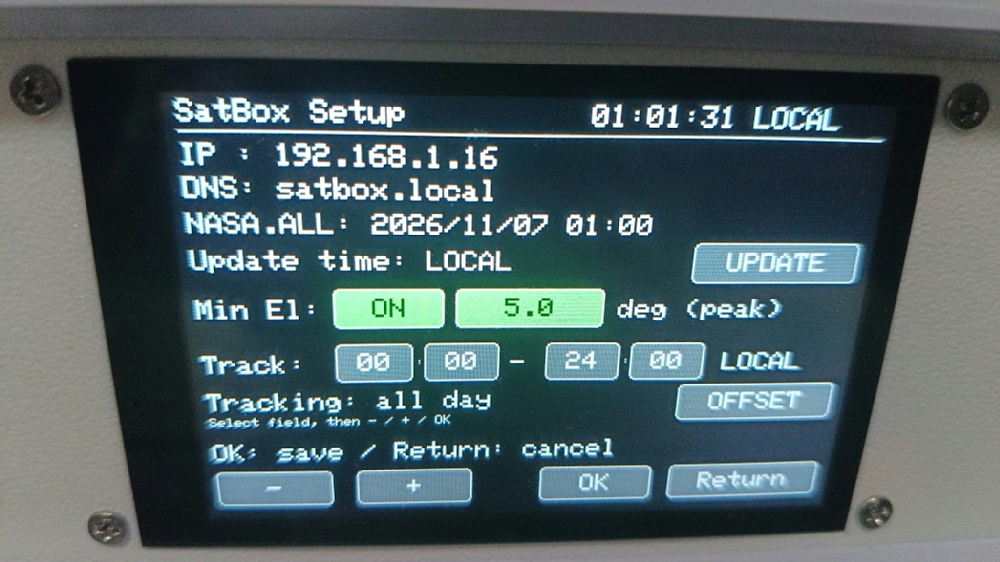
|
|||||||||||||||||||||||||||||||||||
3.5-inch Touchscreen LCD and Front-panel OperationThe front panel has a3.5-inch LCD with a capacitive touchscreenand a rotary encoder. The main screen shows the current time, satellite name, AOS/LOS, azimuth at AOS, maximum elevation, current AZ/EL, uplink/downlink frequencies, operating modes and RX OFFSET.The LCD and rotary encoder let you set radio frequencies, start/stop Doppler control, select satellites and control the rotator directly from SatBox. 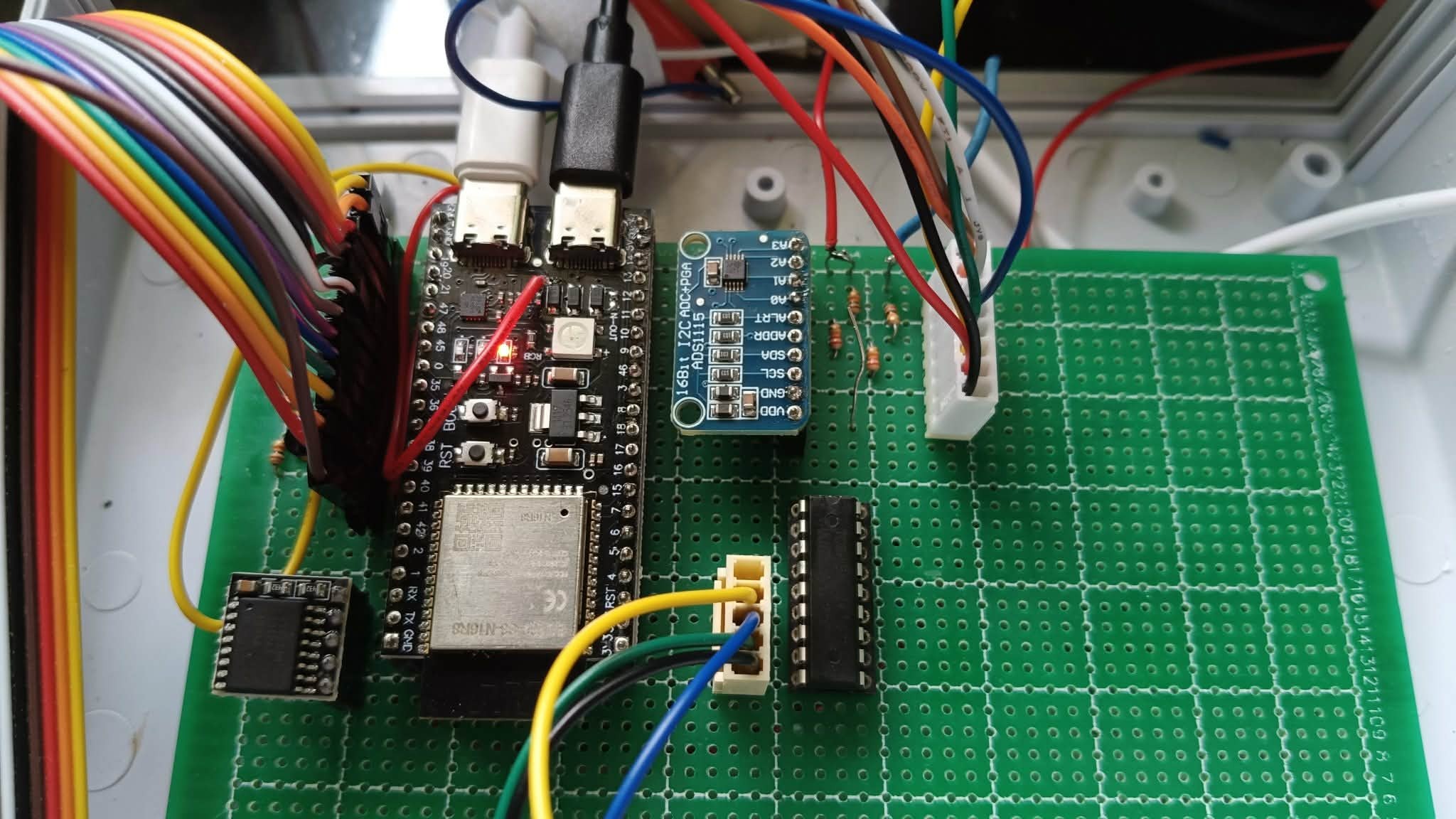 Inside SatBox: ESP32-S3, RTC and rotator-control circuitry. The photograph shows prototype wiring.
|
|||||||||||||||||||||||||||||||||||
SatBox PCBThe dedicated SatBox PCB design is complete, and I plan to order PCB fabrication and assembly (PCBA) from JLCPCB. No order has been placed yet, so the published PCB has not been tested on actual hardware.As I am living on a pension, I have not yet been able to cover the approximately JPY 15,000 cost of the order. Donations to help fund development would be greatly appreciated. PayPal: du9@ji1fgx.com 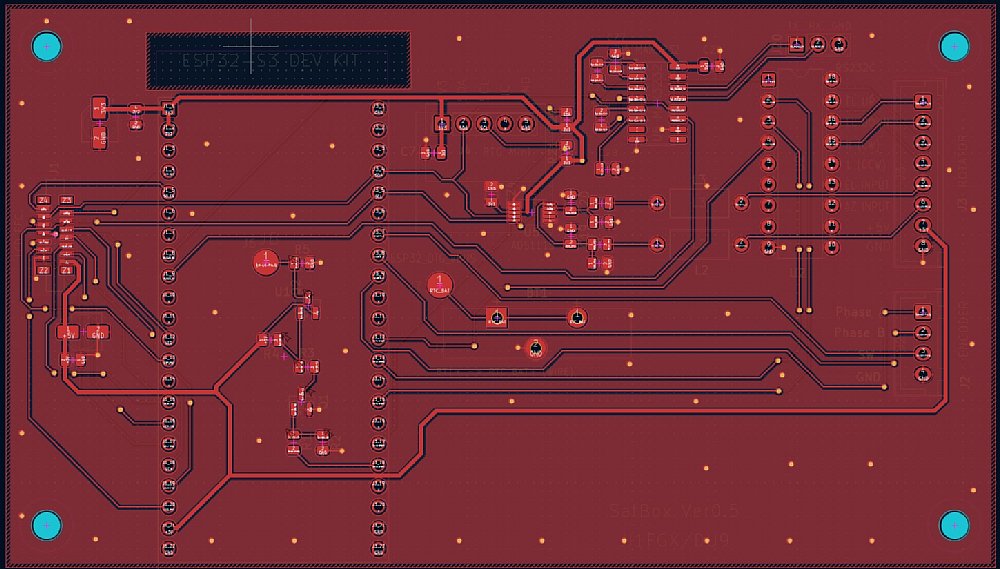 Dedicated SatBox PCB layout designed in KiCad. Fabrication, assembly and hardware verification are still pending.
|
|||||||||||||||||||||||||||||||||||
Satellite Selection and Pass PredictionPress Sat to display the satellites registered for tracking. Each entry shows the countdown to the next AOS, AOS/LOS times and maximum elevation (Max El). Up to 10 satellites can be registered in Web setup.Checked satellites are tracked in sequence according to the configured minimum elevation and tracking time window. 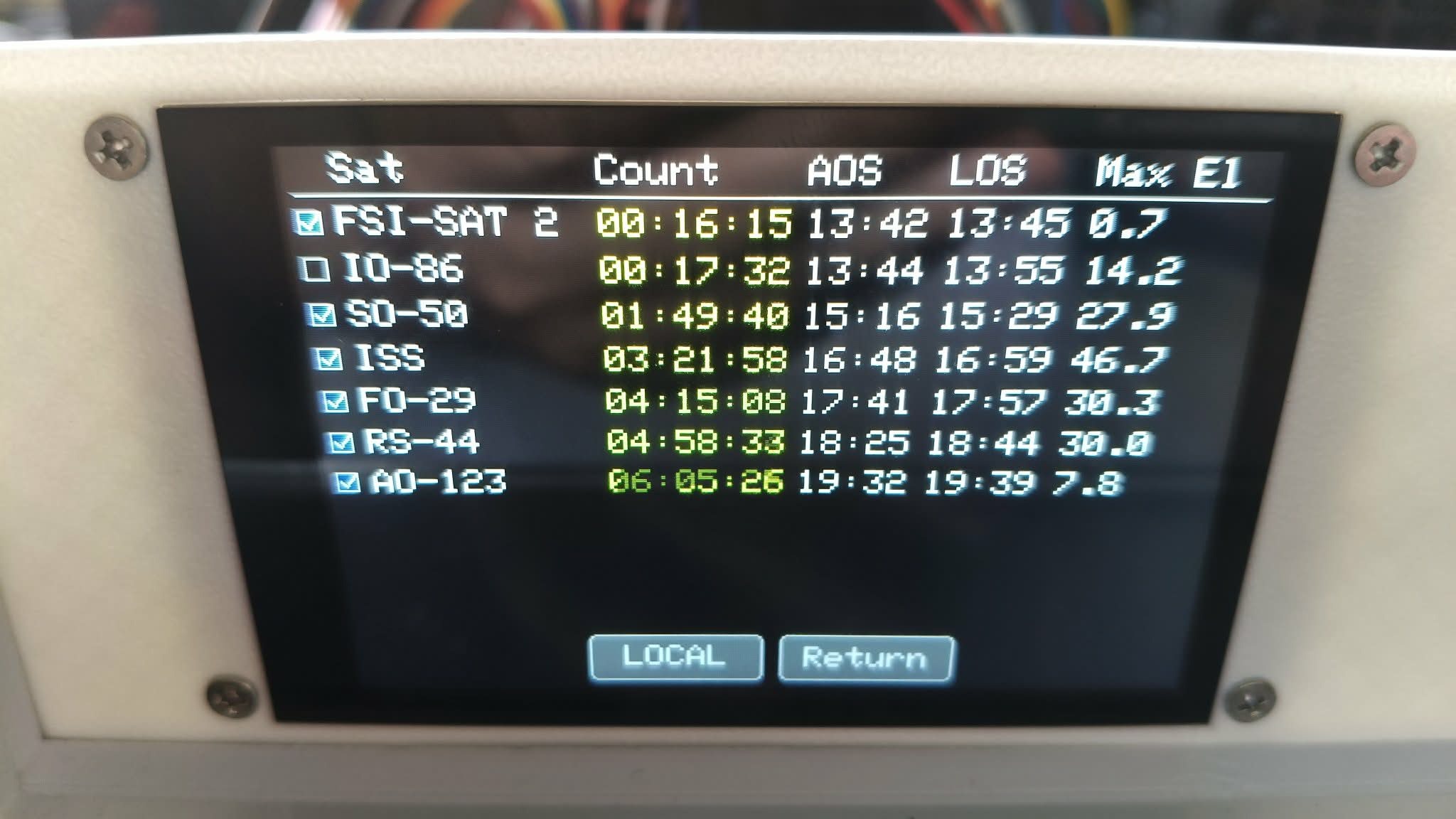 Satellite list showing upcoming passes for FSI-SAT 2, IO-86, SO-50, ISS, FO-29, RS-44, AO-123 and others. |
|||||||||||||||||||||||||||||||||||
AZ/EL Rotator ControlSatBox calculates satellite positions in real time andautomatically controls both AZ (azimuth) and EL (elevation) axesof the antenna rotator.The Manual Rotor touchscreen page also provides direct AZ left/right and EL up/down controls. Position sensing can be calibrated in the Web interface. 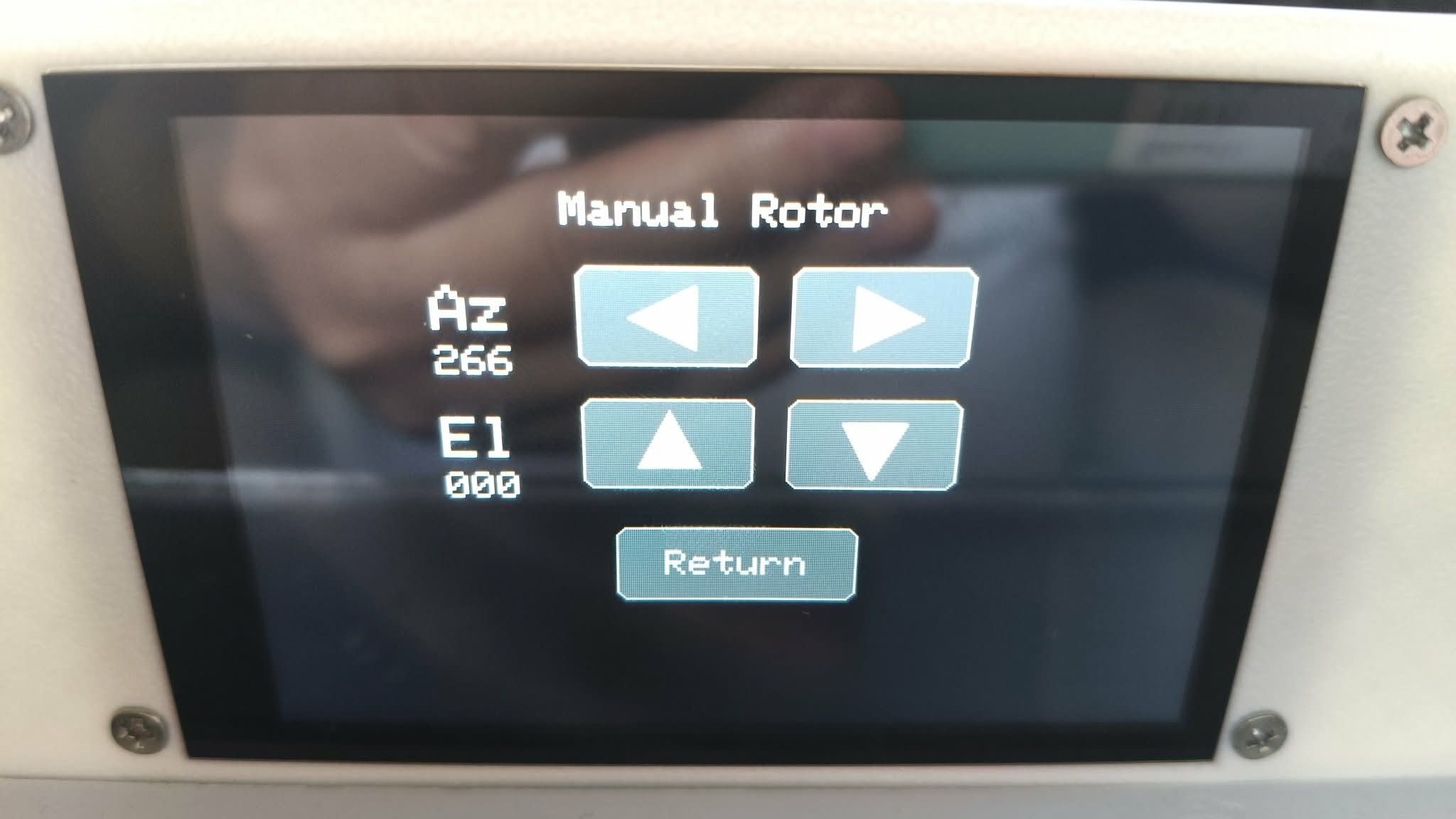 Manual Rotor screen: touch controls move AZ left/right and EL up/down. |
|||||||||||||||||||||||||||||||||||
Automatic Radio Doppler ControlSatBox calculates Doppler shift from the relative motion of the satellite and ground station and automatically corrects transmit and receive frequencies. Currently supported radios are theICOM IC-820Hand in theYAESU FT-847.ICOM radio control uses a CI-V interface. Both FM and linear-transponder satellites such as RS-44 and FO-29 are supported. For a linear satellite, anRX OFFSETadjusted to the actual received signal can be saved per satellite and automatically applied on later passes. Automatic Orbital-data UpdatesSatBox obtains orbital elements (TLEs) from AMSAT nasa.all. Downloads run at startup and at 13:00 daily, with the scheduled update skipped if data has already been downloaded that day. Manual updates are also available from Satellite Selection. |
|||||||||||||||||||||||||||||||||||
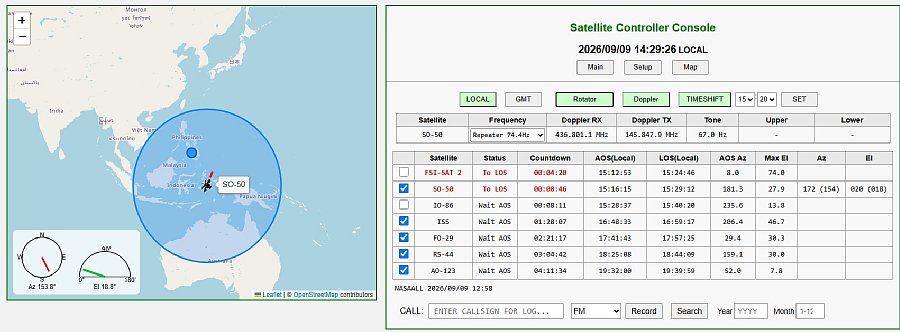
Web-browser OperationSatBox has a built-in Web server. A PC, tablet or smartphone on the same LAN can display satellite information and operate SatBox through a browser.The Web console provides LOCAL/GMT display, rotator and Doppler control, TIME SHIFT, satellite/frequency information and QSO entry. 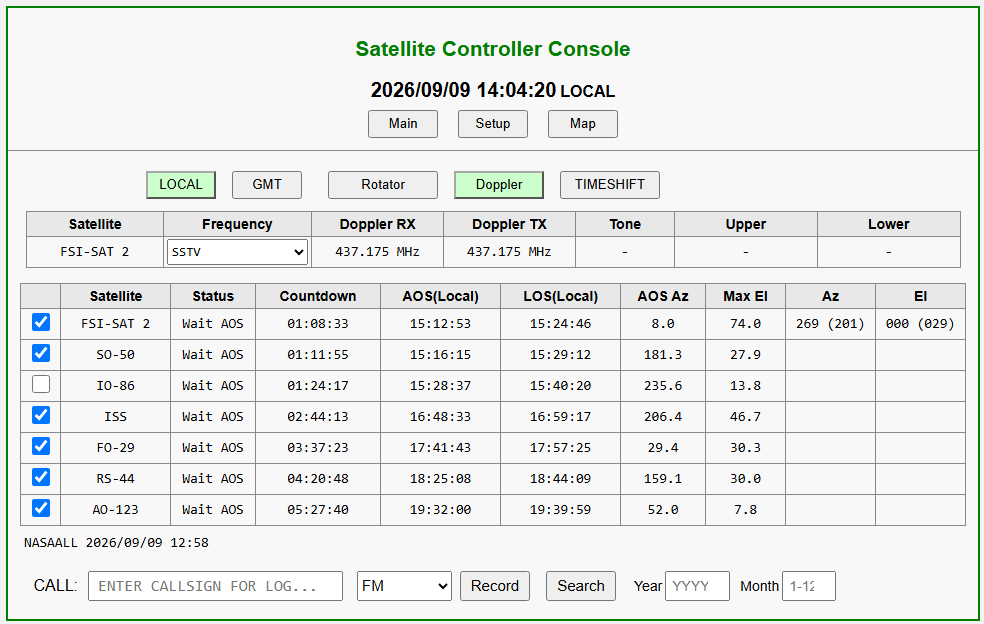 Complete Web console: map on the left, satellite information and controls on the right. |
|||||||||||||||||||||||||||||||||||
Map DisplayThe Web interface shows the current satellite position on a map alongside AZ/EL meters.This makes it easy to see where the satellite is flying over the Earth, as well as its numerical position. Operating settings let you specify the minimum elevation and time window for automatic tracking. 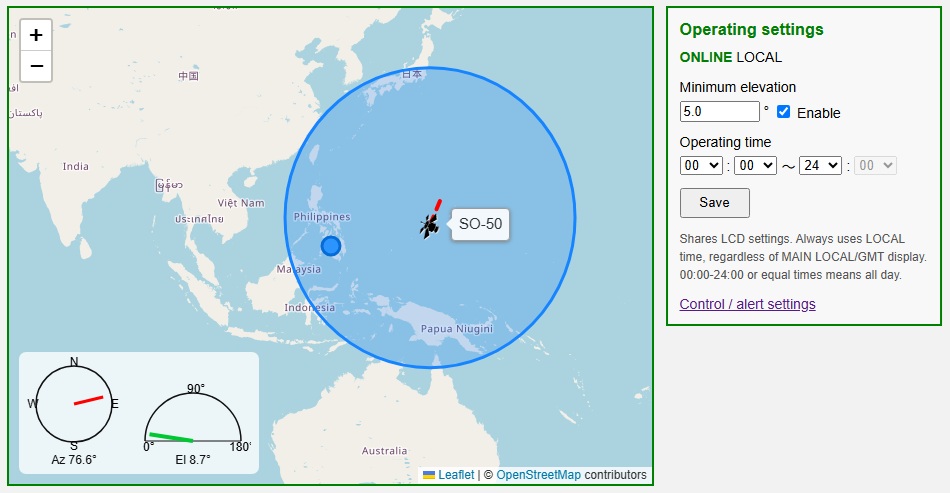 Enlarged map showing the satellite position and AZ/EL meters. |
|||||||||||||||||||||||||||||||||||
Web ConsoleFor each selected satellite, the console lists status, countdown to AOS, AOS/LOS, azimuth at AOS, maximum elevation and current AZ/EL.Use the frequency selector to choose the mode and frequency preset for each satellite. TIME SHIFTvirtually advances the time so that upcoming satellite passes can be examined in advance. Check the satellites you want to track; SatBox tracks them in sequence according to the configured conditions.
 |
|||||||||||||||||||||||||||||||||||
SetupChange the main SatBox settings from the Web Setup menu.The menu uses two columns: Network, Station, Satellites, Doppler, OFFSET, Calibration, Radio, Control, Download All Settings and Restore All Settings. Downloaded settings include Wi-Fi and SMTP passwords. Keep the file private. Restoration restarts SatBox; reconnect using the restored network settings. 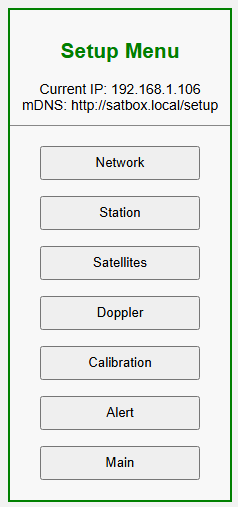 |
|||||||||||||||||||||||||||||||||||
Network SetupConfigure the hostname, DHCP, IP address, gateway, SSID, Wi-Fi password and related network settings.With DHCP enabled, the router assigns an IP address automatically. On devices supporting mDNS on the same LAN, you can access SatBox by hostname even when DHCP is enabled. Example: http://satbox.local/ 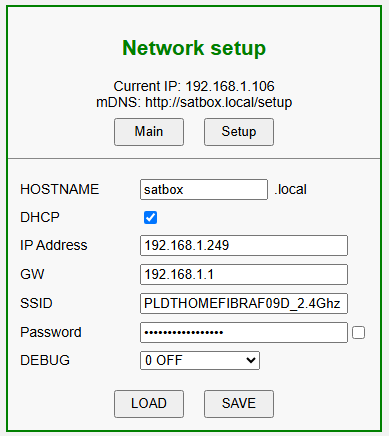 Network Setup screen
|
|||||||||||||||||||||||||||||||||||
Station SetupConfigure the call sign, latitude, longitude, altitude, time zone, daylight saving time, display language and grid locator.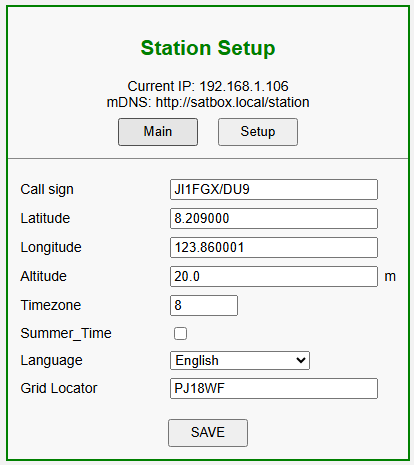 |
|||||||||||||||||||||||||||||||||||
Satellite SelectionSelect up to 10 tracking satellites from those available in nasa.all. This page also provides a manual nasa.all update.SatBox downloads nasa.all at startup when Wi-Fi is connected. The daily update runs at 13:00 local device time, unless data has already been downloaded that day. If startup download fails, it retries every 60 seconds while Wi-Fi is connected. If a scheduled update fails, saved data is used. 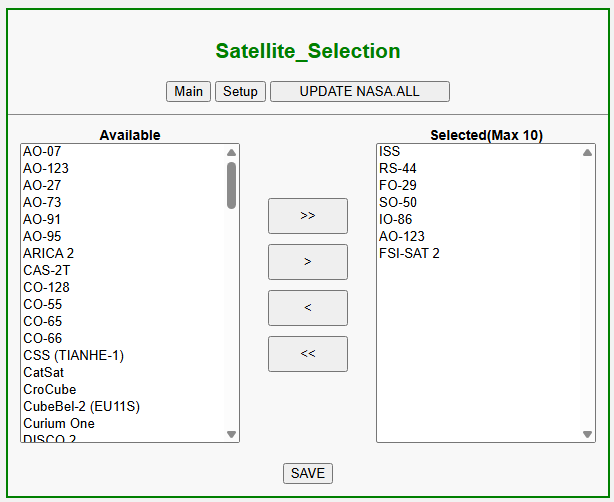 |
|||||||||||||||||||||||||||||||||||
Doppler SetupConfigure each satellite’s uplink/downlink frequencies, transmit/receive modes, NORMAL/REVERSE operation, frequency limits and tone frequency.Important: the meaning of CSV column 3 depends on the modes.When both transmit and receive modes are USB or LSB and the direction is C = transmit MHz + actual receive MHz FO-29 example: for 145.950MHz transmit and 435.850MHz actual receive,145.950 + 435.850 = 581.800. Enter
Using the same C, 145.900MHz transmit corresponds to 435.900MHz receive, and 146.000MHz transmit corresponds to 435.800MHz receive. In this software, column 3 is the actual downlink frequency in MHz for fixed FM/CW operation, CSV column order (10 columns) Keep all 10 columns even when the final comment is empty. Lines beginning with 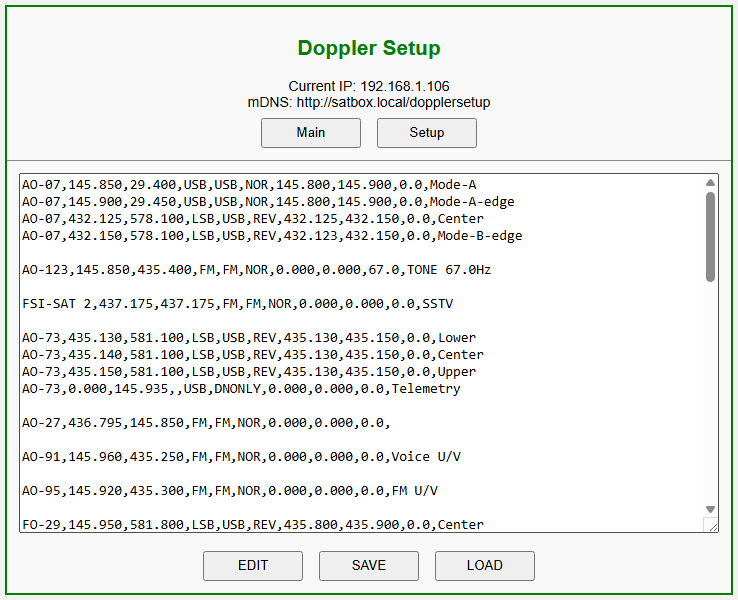 |
|||||||||||||||||||||||||||||||||||
Rotator CalibrationCalibrate AZ/EL position sensing for your rotator while checking sensor RAW values, voltages and calculated angles.AZ (azimuth) calibration Move the rotator to 0 degrees and press the 0-degree button. Move to 360 or 450 degrees according to the rotator’s travel range and press the corresponding button. Press Save. EL (elevation) calibration Move the elevation rotator to 0 degrees and press the 0-degree button. Move to 180 degrees and press the 180-degree button. Press Save. Reversal delay inserts a stop before changing direction to reduce frequent forward/reverse switching. 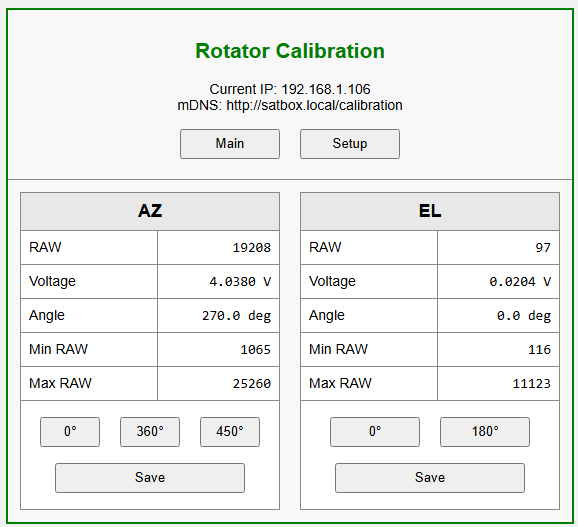 |
|||||||||||||||||||||||||||||||||||
Radio SetupOperation is currently being checked with the ICOM IC-820H and YAESU FT-847.IC-9700 CI-V control through CT-17 is implemented in SatBox_Ver0.1.1c-beta, but has not yet been tested on a real radio. Configure the radio model, interface, CAT/CI-V baud rate and ICOM CI-V address. SatBox offers 4800 / 9600 / 19200 / 38400 / 57600 / 115200 bps for IC-9700. Choose a rate supported by the actual radio port and interface, and match the corresponding CI-V setting on the radio. Distinguish the REMOTE-port CI-V settings from the USB CI-V settings. 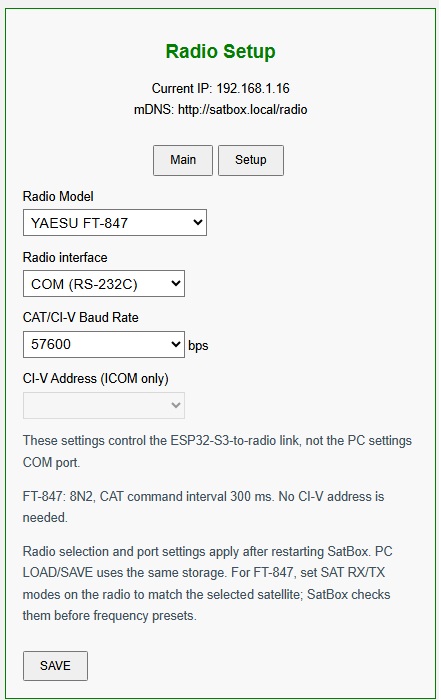 |
|||||||||||||||||||||||||||||||||||
Control SettingsAutomatic controlMinimum elevation: set the elevation threshold for automatic tracking. Tracking time window Set the permitted automatic tracking hours in local time. Alerts: receive an email notification before satellite AOS. Set how many minutes before AOS the email is sent. Set the email notification time window in local time. Mail settings Recipient email address SMTP server, username and password Passes whose maximum elevation is below the threshold can be excluded from email/voice alerts, automatic tracking and Doppler control. 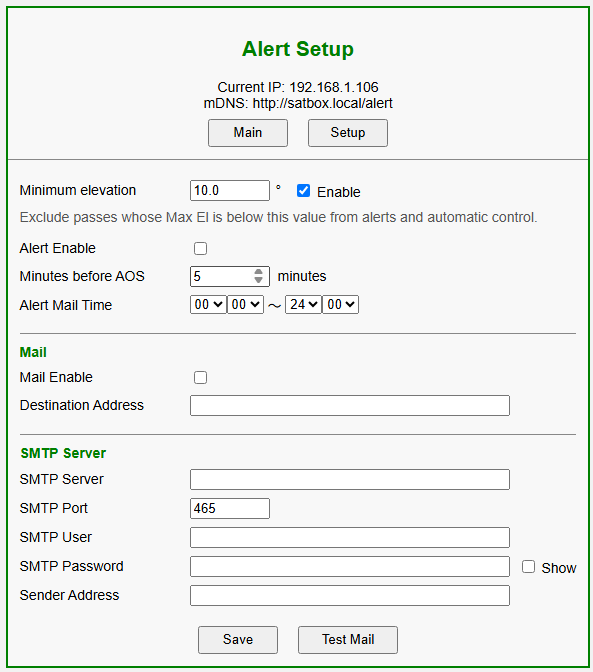 |
|||||||||||||||||||||||||||||||||||
Smartphone AOS AlarmInstall the dedicated SatBox AOS Alert smartphone app to obtain AOS times and maximum elevations for selected satellites and sound an alarm at the chosen time.Configure the lead time before AOS, minimum elevation and permitted alarm hours. This feature worksonly while SatBox and the smartphone are on the same local-area network. 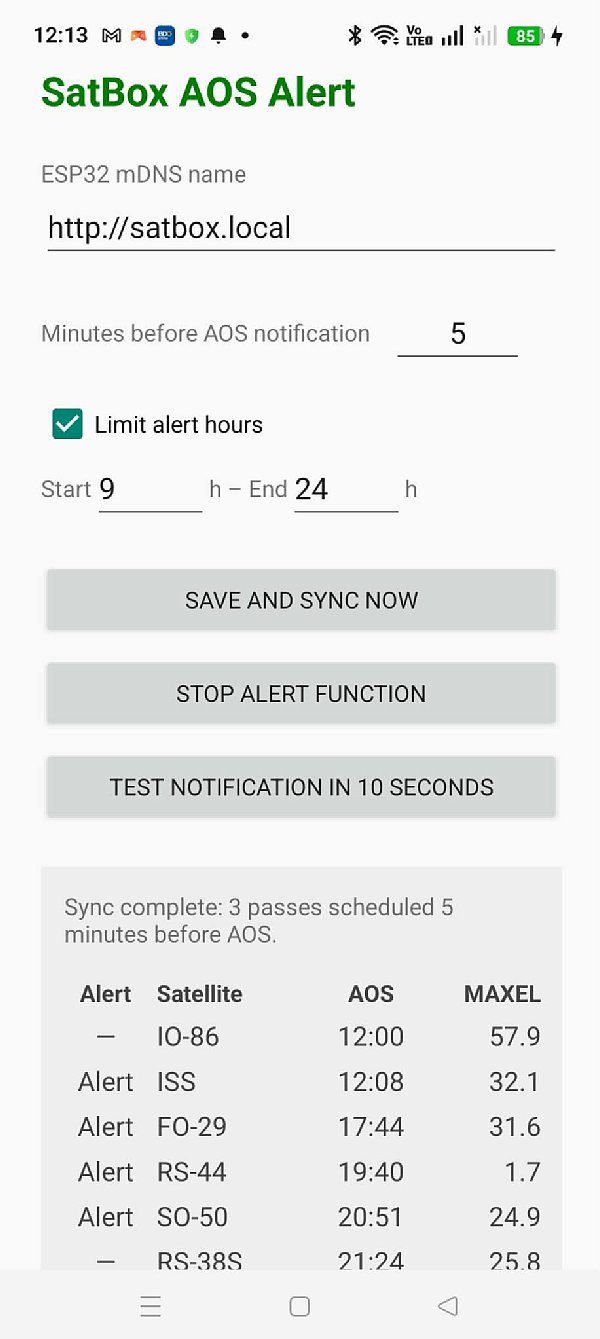 SatBox AOS Alert app setup and synchronization screen. |
|||||||||||||||||||||||||||||||||||
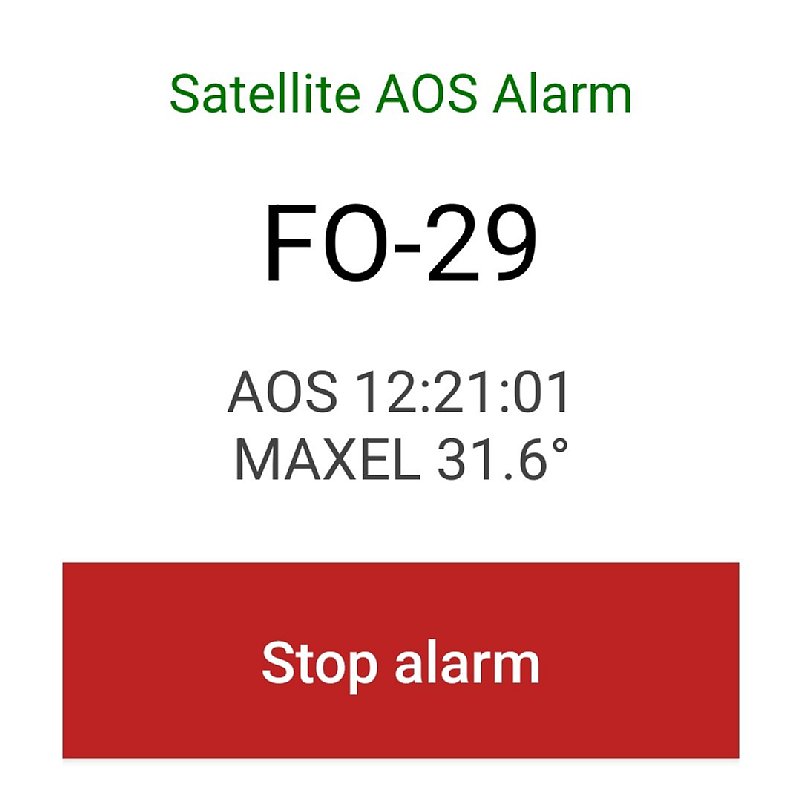 Smartphone AOS alarm showing the satellite name, AOS time and maximum elevation.
|
|||||||||||||||||||||||||||||||||||
QSO LoggingSatBox provides QSO entry for satellite operation. After a contact, enter the other station’s call sign, operating mode and other details in the Web console.The Windows PC application SatBox_Log_Server.py receives QSO data and saves it as anADIF fileand in theSat_logbook.dbdatabase on the PC. Saved contacts can also be uploaded toLoTW(Logbook of The World)、Club Log、eQSL. Search and view previous contacts in a Web browser, including UTC date/time, call sign, satellite, mode, band, transmit/receive frequencies and country. Logging currently requires Windows, withSatBox_Log_Server.exerunning in the background. 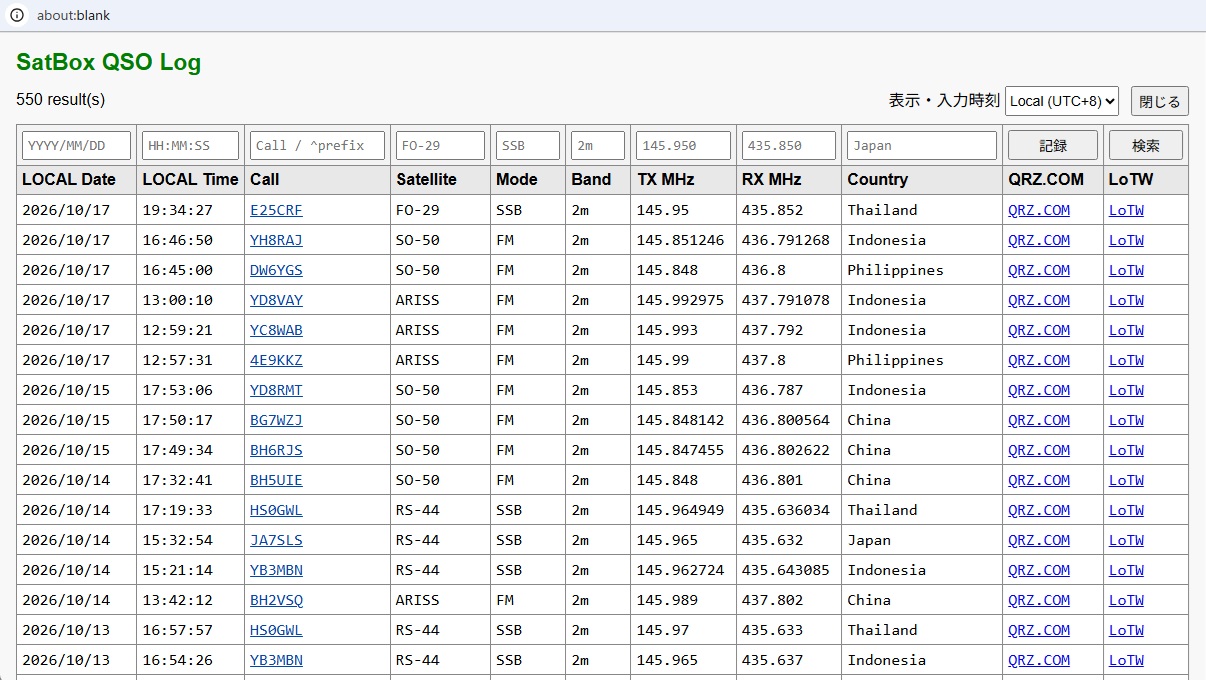 QSO search screen showing contact history and links to QRZ.COM and LoTW. |
|||||||||||||||||||||||||||||||||||
The Goal of SatBoxSatBox is being developed toperform satellite tracking and radio control without a PC and bring operating functions together.SatBox coordinates the operating sequence: orbital-data download → pass prediction → AOS notification → satellite selection → automatic AZ/EL tracking → radio Doppler correction → satellite communication → QSO logging → upload to LoTW / Club Log / eQSL. Logging and service uploads use the Windows companion server. Radios currently being checked are the ICOM IC-820H and YAESU FT-847. IC-9700 control through CT-17 is implemented but has not yet been tested on a real radio. SatBox is under development; functions, screens and specifications may change. |
|||||||||||||||||||||||||||||||||||
| September 4, 2026 September 12, 2026 | |||||||||||||||||||||||||||||||||||